
A WordPress plugin for creating, displaying, and tracking affiliate reviews. Built for the LetsGrowMore dark theme with full colour customisation, click analytics, and multiple display layouts.
Installation
- Download the plugin from your dashboard
- Upload the plugin: Go to
Plugins → Add New → Upload Pluginin your WordPress admin. Select thegrow-more-reviews.zipfile and click Install Now. - Activate: Click Activate Plugin. The plugin creates a “Reviews” menu in your admin sidebar and sets up the click tracking database table automatically.
- Demo data (first install): On first activation, sample reviews are created so you can see the plugin in action immediately. You can edit or delete these at any time.
Updating
⚙️ Updating: To update, upload the new zip through Plugins → Add New → Upload Plugin. WordPress will show “This plugin is already installed” — click Replace installed with uploaded. All your review data and click analytics are preserved.
Creating Reviews
- Go to Reviews → Add New in your WordPress admin.
- Enter the review title — this becomes the page heading and SEO title.
- Write your full review content in the standard WordPress editor. Use headings, images, lists — anything you’d use in a normal post.
- Fill in the Review Details meta box below the editor (see Review Fields for each field).
- Assign a Review Category in the sidebar taxonomy box (e.g. “Prop Firms”, “Trading Platforms”).
- Click Publish. The review is now live with a hero card, pros/cons, and CTA button auto-generated on the single page.
Review Fields
These fields appear in the “Review Details” meta box when editing a review.
| Field | Required | Description |
|---|---|---|
| Brand Name | Yes | Company or product name. Shown in the hero card, table rows, and sidebar widgets. Falls back to the post title if empty. |
| Logo | Recommended | Square image (min 80×80px). Uploaded via the Media Library picker. Used across all card layouts. |
| Rating | Yes | Score from 0.0 to 5.0 (half-star increments). Rendered as star icons with a numeric label. |
| Slogan / Tagline | Optional | Short description (max 120 chars). Shown in the card row layout beneath the brand name and stars. |
| Article URL | Optional | Link to the full review page. Defaults to the WordPress permalink if empty. |
| Affiliate URL | Optional | Your affiliate/tracking link. Used as the CTA button destination. Automatically adds rel="nofollow sponsored noopener". |
| CTA Button Text | Optional | Text shown on the call-to-action button. Defaults to “Visit Site”. |
| Badge | Optional | Label like “TOP RATED”, “DEAL”, “NEW”. Displayed as a coloured pill next to the brand name. |
| Pros | Optional | One pro per line. Shown with green checkmarks on the single review page. |
| Cons | Optional | One con per line. Shown with red crosses on the single review page. |
[ gmr_reviews ]
The main review display shortcode. Renders reviews as horizontal card rows with logo, brand name, stars, slogan, and CTA button. Best for dedicated review pages.
Basic Usage
[gmr_reviews]Shows the 10 most recent reviews.
Specific Reviews
[gmr_reviews ids="42,87,103"]Show specific reviews by post ID, in the order listed.
Parameters
| Attribute | Default | Description |
|---|---|---|
| ids | empty | Comma-separated post IDs. If set, only these reviews are shown in the specified order. |
| limit | 10 | Max number of reviews (1–10). Ignored when ids is set. |
| orderby | post__in | WordPress orderby value: date, title, rand, post__in, etc. |
| show | logo,brand,rating,slogan,cta | Comma-separated list of visible columns (for backwards compatibility). |
| class | empty | Extra CSS class added to the wrapper <div>. |
Examples
Top 5 by date
[gmr_reviews limit="5" orderby="date"]Custom order with CSS class
[gmr_reviews ids="42,87,103" class="featured-reviews"]Compact mini cards designed for embedding inside blog posts and articles. Single-row layout with logo, brand, stars, badge, and CTA — no table headers, no overflow.
⚙️ Recommended for blog posts: Use [ gmr_mini ] when embedding reviews inside article content via the Grow More AI Content plugin. It’s specifically designed to fit within narrow content containers without breaking the layout.
Basic Usage
[gmr_mini ids="42,87"]Parameters
| Attribute | Default | Description |
|---|---|---|
| ids | empty | Comma-separated post IDs. If empty, shows most recent reviews. |
| limit | 5 | Max number of reviews. |
| class | empty | Extra CSS class on the wrapper. |
Layout
Each card is a single flex row:
[#1 Logo] [Brand Name BADGE ★★★★☆ 4.5] [VISIT SITE]On mobile (<480px), the CTA button drops below as a full-width button.
[ gmr_archive ]
Full archive page with category filter tabs, card grid, and optional sidebar. Use on a dedicated “Our Reviews” page.
Basic Usage
[gmr_archive]Parameters
| Attribute | Default | Description |
|---|---|---|
| show_sidebar | no | Set to yes to show a sidebar with top-rated reviews alongside the grid. |
| columns | 2 | Number of grid columns for review cards. |
| class | empty | Extra CSS class. |
Example with Sidebar
[gmr_archive show_sidebar="yes" columns="3"]⚙️ Page Template: For best results, use a full-width page template (no theme sidebar). The shortcode defaults to show_sidebar="no" to avoid conflicts with Elementor containers.
[ gmr_sidebar ]
Vertically stacked compact cards designed for sidebar widgets (250–350px wide).
Basic Usage
[gmr_sidebar title="Top Picks" limit="3"]Parameters
| Attribute | Default | Description |
|---|---|---|
| ids | empty | Comma-separated post IDs. |
| limit | 5 | Max reviews (1–10). |
| title | empty | Heading displayed above the cards. |
| class | empty | Extra CSS class. |
Each card shows: Logo → Brand Name → Star Rating → CTA Button, stacked vertically.
Single Review Page
When a visitor opens a review, the plugin automatically injects:
Hero Card (top of content)
A styled card above your content showing the logo, brand name, badge, star rating, slogan, pros & cons, and CTA button. This is generated automatically from the review fields — no shortcode needed.
Bottom CTA Bar (after content)
A “Ready to try [Brand]?” call-to-action bar at the bottom with logo and CTA button.
More Reviews (after CTA)
Automatically shows 3 related reviews from the same category to encourage further browsing.
Sidebar Replacement
On single review pages, the theme sidebar is automatically replaced with a review-specific sidebar showing the brand logo, rating, and quick CTA.
Colour Settings
Go to Reviews → ⚙️ Settings to customise all colours. Changes apply across every shortcode, single page, and widget.
Colour Pickers
12 colour settings organised into 3 groups, with a live preview card that updates in real-time:
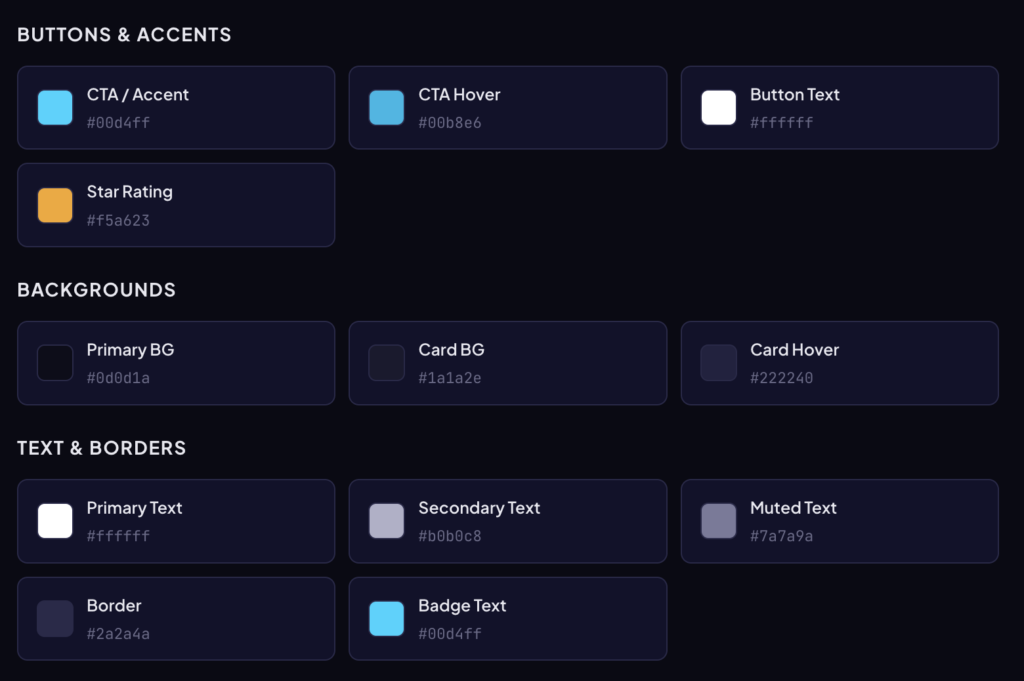
⚙️ How it works: Saved colours are injected as CSS custom properties in the <head> via wp_head. The Button Text colour is applied with !important to override any theme styles. If all colours match the defaults, no extra CSS is output (zero performance impact).
Click Analytics
Go to Reviews → 📊 Analytics to see click data.
What’s Tracked
| Event | Trigger | Description |
|---|---|---|
| review_click | Any non-CTA link | Brand name, “Read review”, “Read more”, or any link inside a review card that goes to the review page. |
| cta_click | .gmr-cta button | The affiliate CTA button (“Visit Site”, “Join Now”, etc.). Opens in a new tab. |
Dashboard Includes
Summary cards showing total review clicks, CTA clicks, combined total, unique visitors (by IP hash), and Review → CTA conversion rate. A daily trend bar chart visualises click volume over time, and a per-review breakdown table shows individual review performance.
Date Range Filters
Filter analytics by: 7 days, 30 days, 90 days, or All Time.
Privacy & Security
IP addresses are hashed with SHA-256 using a daily rotating salt — the original IP cannot be recovered. Rate limiting (10 clicks/IP/review/minute) prevents spam. Analytics data persists across plugin updates. The manage_options capability is required to view the analytics page.
⚙️ Caching Compatibility: Click tracking works with page caching plugins (WP Super Cache, LiteSpeed, Cloudflare, etc.). The nonce is optional for tracking requests, so stale cached pages won’t cause silent tracking failures.
Using with AI Content Plugin
When your Grow More AI Content plugin generates articles, it can embed review cards. Configure it to insert the shortcode as a text string, not rendered HTML.
Recommended Shortcode for Blog Posts
[gmr_mini ids="42,87"]The [ gmr_mini ] shortcode is purpose-built for blog embeds — compact, responsive, and stays within the content container.
⚙️ Important: Your content plugin must store the literal shortcode text (e.g. [ gmr_mini ids=”42,87″ ]), NOT the rendered HTML output. If it stores rendered HTML, the shortcode won’t execute on the frontend, and any inline scripts will leak as visible text on the page.
Finding Review Post IDs
Go to Reviews → All Reviews. Hover over a review title — the post ID appears in the URL at the bottom of your browser (e.g. post=42). You can also see IDs in the ID column if enabled via Screen Options.
Troubleshooting
JavaScript code visible on the page
This means rendered HTML is being inserted instead of the shortcode string. Check your content plugin to ensure it outputs [ gmr_mini ids=”…” ] as text. Also hard-refresh (Ctrl+Shift+R) to clear cached JS files after updates.
CTA button text invisible
Go to Reviews → Settings and set the “Button Text” colour to #ffffff (white) or another colour that contrasts with your accent colour. The button text colour is applied with !important.
Reviews overflowing the container
Use [ gmr_mini ] instead of [ gmr_reviews ] for blog post embeds. The mini cards are designed for narrow containers. For full-width pages, [ gmr_reviews ] uses 98% width and adapts to its parent.
Click analytics showing 0 review clicks
Ensure you’re running v2.5.4+. Older versions only tracked clicks on the brand name link. The current version tracks all link clicks inside review cards. Also hard-refresh to load the updated tracker JS.
Single review page missing header/nav
The plugin uses your theme’s default template (not a custom template) to preserve Elementor header rendering. The hero card and CTA bar are injected via the the_content filter.
Styles not matching the theme
Customise colours in Reviews → Settings to match your theme. The plugin uses CSS custom properties, so changes apply globally. If colours still conflict, the settings page outputs rules with !important to override theme styles.